


The Original Console Retro Kid™
The Original Console Retro Kid™


Couldn't load pickup availability
Will my favorite games be on it?
Will my favorite games be on it?
40,000+ complete games from 20+ classic systems come loaded and ready the moment you unbox it. There is nothing to set up, download or connect to Wi‑Fi, and all the platformers, racers, fighters and adventures you grew up with are already waiting.
Looking for one title in particular? Search it in the Game Search below or open the full game list. (Based on the 128GB model.)
Free shipping & satisfaction guarantee
Free shipping & satisfaction guarantee
Every order ships free, with no minimum spend. We hand your parcel to the carrier within 1 business day and it usually arrives in 9–14 business days in the US. A tracking link is emailed to you as soon as it leaves.
Not happy? Send it back for a refund of the product price, and if it arrives faulty, damaged or wrong we cover the whole cost. Details are in our Returns & Refunds policy.
Can I save my progress?
Can I save my progress?
Yes, in every game. Press Select + R1 to save the exact moment you are at and Select + L1 to load it again. No passwords and no starting from scratch, on every platform. You can also save and load from the in-game quick menu with Select + X.
There is room for thousands of save slots, so everyone at home can keep their own progress.
Does it come with a warranty?
Does it come with a warranty?
Yes. Each Retro Kid™ has a 1-year warranty from the day it is delivered. If a fault appears during normal use, we repair or replace it for free and you pay nothing to send it back.
Covered: screen faults and dead pixels, buttons or joysticks that stop working, charging port and battery failure, SD card failure and sound problems. Not covered: drops, liquid damage and cosmetic wear.
Read the full terms on our 1-Year Warranty page.
64GB or 128GB: which one is right for me?
64GB or 128GB: which one is right for me?
Both models play the same 20 consoles and arrive fully loaded. The 64GB card comes with 20,000+ games. The 128GB card holds 40,000+, including the bigger PSP and PS1 titles that do not fit on the smaller card, and leaves extra space for your saves.
About 4 in 5 shoppers pick the 128GB for the bigger library, and it costs only $10 more.
-
Ordered
- - -
Order Ready
- - -
Delivered
-

Ordered on a whim. When the Pokémon theme started playing I got actual goosebumps. Build quality is way better than I expected.
-

Bought it as a birthday gift for my husband. He found the exact wrestling game he played in 5th grade within two minutes. Best money I've spent.
-

Battery lasted my entire LAX–JFK flight with plenty to spare. Save states mean I never lose progress when boarding.


The Original Console Retro Kid™


Game Search
Make sure your favorite games are on board before you order. (Based on the 128GB model)

Back to the Good Old Days
Bring back the golden age of gaming with Retro Kid™. Pick 20,000+ games (64GB) or 40,000+ games (128GB), already installed across 20 legendary console emulators, with up to 8 hours of play on one charge. Your childhood favorites, wherever you go.

A Library That Never Runs Out
Retro Kid™ is made for reliving the games you grew up with. Browse 40,000+ titles across platformers, RPGs, shooters, fighters, racers, sports and adventure classics, from the big hits you remember to hidden gems you never got to play.

Controls & Screen Made for Play
Two joysticks, L/R shoulder buttons and a bright 3.5″ IPS screen at 640×480 give you precise control and sharp, colorful visuals. It plays like the classics, on modern hardware.

Smooth, Fast Performance
An RK3326 64-bit 1.5GHz processor and a Mali-G31 MP2 graphics chip keep every game running smoothly, so you spend your time playing instead of waiting.
Why So Many Gamers Choose Retro Kid™
Retro Kid™ is the original. Knock-offs copy the outside, not the parts inside.
Here's the difference.
| RetroKid™ | Cheap clones | |
|---|---|---|
| Chips | 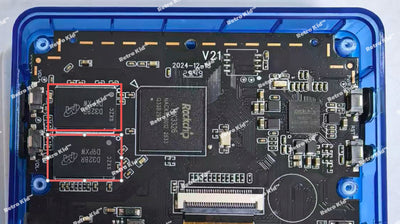 ✓ Two quality memory chips, 1GB combined |
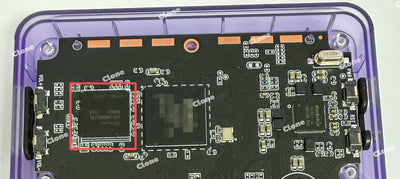 ✗ A single 512MB chip, half the speed |
| Game Saves | ✓ Save whenever you like, progress never lost |
✗ Often no way to save at all |
| Game Contents | ✓ Full games with every level |
✗ Demos that cut off early |
| Performance | ✓ Every game tested, starts in seconds |
✗ Frequent freezes, lag or crashes |
| Multiplayer | ✓ Supports Wi-Fi |
✗ Not supported |
| Screen | ✓ Bright IPS panel, checked for dead pixels |
✗ Dull screen, dead pixels are common |
| Build Quality | ✓ Genuine parts, every unit tested |
✗ Recycled or mismatched parts |
| SD Card | ✓ Brand-name card, tested before it ships |
✗ Low-grade cards with fake capacity |
| Support | ✓ Replies within 24 hours, spare parts in stock |
✗ No help once you have paid |
| Price | ✓ Everything included, no hidden fees |
✗ Cheaper upfront, extra costs later |
What Gamers Say
“Best gift I’ve bought in years”
Got this for my husband and he hasn’t put it down. All the games we grew up with, zero setup — it just works.
“Feels exactly like 2002 again”
The screen is way sharper than I expected and the buttons feel great. Battery easily lasts a full flight.
“20,000 games is not a typo”
Every console I had as a kid is on here. Save states make it perfect for quick sessions. Worth every penny.
Frequently Asked Questions
How Do I Save My Progress?
Press Select + X during a game to open the quick menu, choose “Save State”, pick a slot and save. Each person can use their own slot, and “Load State” takes you straight back.
For a quick save, use the shortcuts:
• Select + R1 saves where you are right now.
• Select + L1 loads that save again.
Is Everything Preloaded? Do I Need a Subscription or Downloads?
Every game is already on the console, so you can start playing straight out of the box. There is no setup, no download, no internet connection, no subscription or membership, and nothing else to buy.
Are These Full Games or Just Short Demos?
They are full versions, playable from the first level to the final credits, just like on the original consoles (PSP, PS1, N64, NES and more). No trials, demos or cut-down editions.
Do I Need Wi-Fi to Play?
No. All the games live on the device, so you can play anywhere, even completely offline.
How Many Games Come With It?
You get 20,000+ games on the 64GB model or 40,000+ games on the 128GB model, across 20 classic consoles and every genre.
To check a specific title, use the Game Search on this page or browse the full game list.
Is There a Parental Control?
Most of the library is family friendly. If you would like to remove a game, you can do it in three steps:
1. On the games screen, press “Select”.
2. Choose “Edit This Game’s Metadata”.
3. Scroll to the bottom right and press “Delete”.
What Comes in the Box?
- Retro Kid™ console (SD card already inserted)
- USB-C charging cable
- User manual
- Screen protector
How Long Does the Battery Last?
One charge gives you 8–10 hours of play, depending on the game and screen brightness. A full recharge takes about 2 hours.
Can I Change the Console Language?
Yes. Retro Kid™ supports 10 languages, including English, French, Spanish, German and Italian.
Will I Pay Extra Fees or Taxes at Checkout?
No. The price you see is what you pay. No sales tax is added at checkout, there are no handling or processing fees, and shipping is free on every order.
You will not owe anything after ordering either. If you are ever asked to pay more than you paid us, email the receipt to support@retrocity.store and we will refund it in full.
How Do Returns and Refunds Work?
If the console is not right for you, send it back unused in its original packaging for a refund of the product price.
Return postage is on you, unless the item is faulty, damaged on the way or not what you ordered. In those cases we cover everything, and usually you will not need to send anything back.
Email support@retrocity.store with your order number and we will send you the return address. See our Returns & Refunds policy for the exact return window. Faults after that are covered by our 1-Year Warranty.
Does It Come With a Warranty?
Yes. Every Retro Kid™ has a 1-year warranty starting on the day it arrives. If a fault shows up during normal use, we repair or replace it for free, with no return shipping cost for you.
Covered: screen faults and dead pixels, buttons or joysticks that stop responding, charging port and battery failure, SD card failure and sound problems.
Not covered: drops, liquid damage, cosmetic wear and normal battery ageing.
Full details are on our 1-Year Warranty page.
You May Also Like
-
Retro Kid™ Joystick Caps (4 pcs)
Regular price €8,13Regular price €8,13 Sale priceUnit price per -
Retro Kid™ Silicone Sleeve
Regular price €9,94Regular price €9,94 Sale priceUnit price per -
Retro Kid™ Tempered Glass Screen Protector (Pack of 3)
Regular price €9,03Regular price €9,03 Sale priceUnit price per -
Retro Kid™ Hand Grip
Regular price €9,94Regular price €9,94 Sale priceUnit price per


